 LIFE CONSOLE
Open-source and self-hosted planners
Most planners are subscriptions that keep your schedule on someone else's server. These five are free and open source, and each one can run on hardware you control. They differ in what they plan: your day, your tasks and projects, or a team's work. Pick by that first.
| Best for | Runs where | Day planning | Licence | |
|---|---|---|---|---|
| Life Console | Planning from goals and deadlines down to today | Browser (installable, offline); free hosted or self-hosted with Docker | Day timeline, Auto time-box, morning and evening review | AGPL-3.0 |
| Super Productivity | Focused solo work with time tracking | Desktop, phone and web apps, data on your device; optional self-hosted sync | Schedule next to your calendar events, timeboxing | MIT |
| Tududi | Life areas, projects and recurring tasks, shared with a household | Self-hosted with Docker and PostgreSQL; installable web app | Today, Upcoming and Someday lists, no timeline | MIT |
| Vikunja | A self-hosted to-do and project app | Single binary or Docker, SQLite to PostgreSQL; paid cloud | No | AGPL-3.0 |
| Leantime | Team projects tied to goals | Self-hosted (PHP and MySQL, or Docker) | No | AGPL-3.0 |
1. Life Console
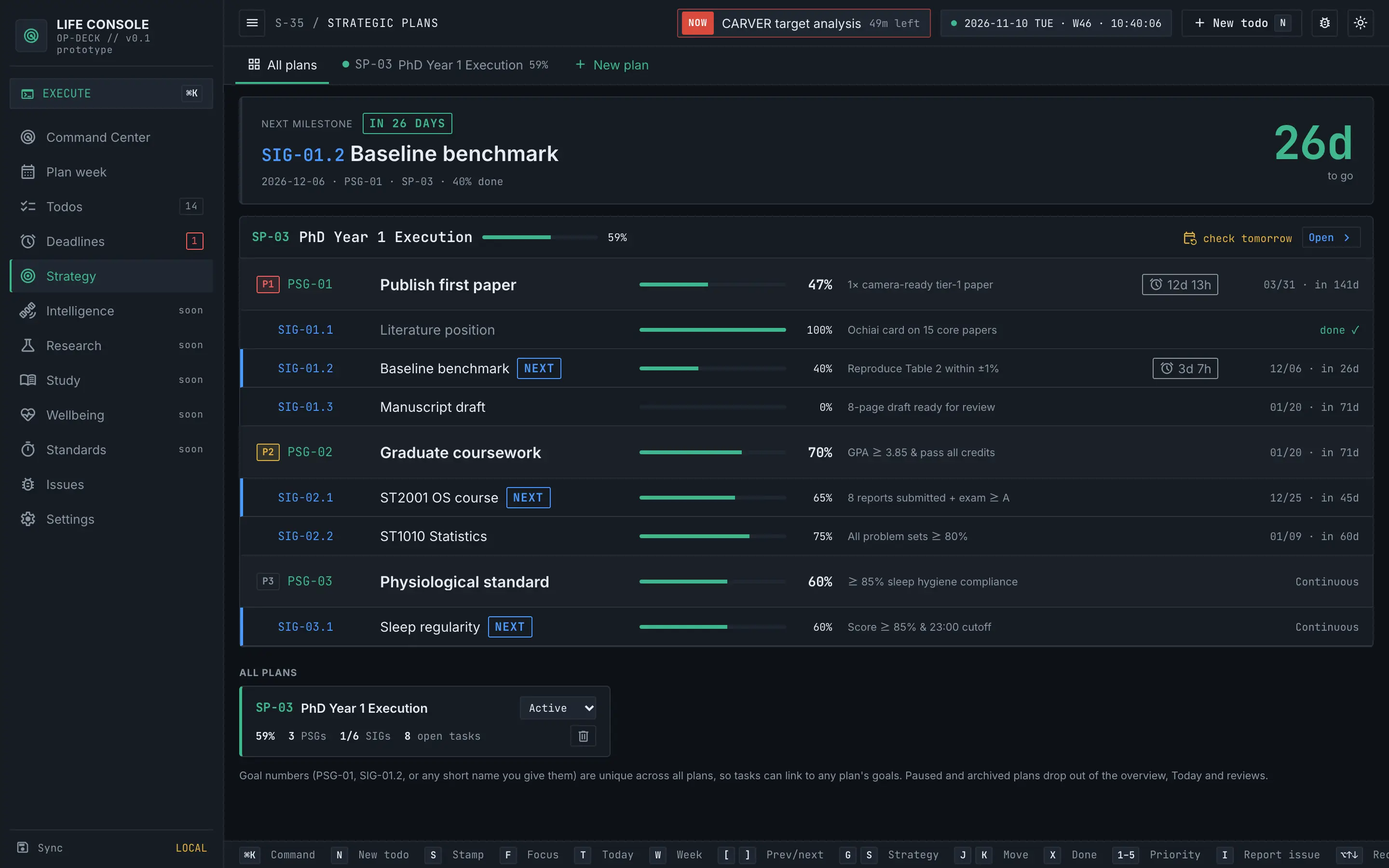
A keyboard-first planner that starts from long-term goals (vision → goals → milestones), turns them into a week plan, and shows the one thing to do right now with a live countdown. Plan week moves tasks from a backlog into a 7-hour budget per day and onto a timeline, and Auto time-box fills free gaps by priority. A morning Briefing and an evening Debrief ask only what needs a decision. Deadlines show as time left, not dates.
- Self-hosting: Docker Compose with PostgreSQL (guide), or use the free hosted version at life-console.dev.
- Lacks: calendar sync, integrations, shared projects and native phone apps (it installs from the browser and works offline).
Life Console vs Sunsama, feature by feature →
2. Super Productivity
A mature to-do list, time tracker and daily planner for one person's focused work, open source since 2017. You plan the day on a schedule next to your calendar events, focus with Pomodoro, Flowtime or countdown sessions, and time is tracked on each task. It imports issues from Jira, GitHub, GitLab, Linear, ClickUp and others and logs time back to them. There's no account: data stays on your device, and sync goes through its own end-to-end encrypted SuperSync (which you can host yourself), Dropbox or WebDAV.
- Pick it over Life Console if you want native desktop and phone apps, time tracking with timesheet exports, or your tasks come from an issue tracker.
- Lacks: long-term goals that tasks link to. It's built for focused work sessions rather than planning a life.
3. Tududi
A calm, self-hosted system for organising life and work: tasks belong to projects, projects to areas, with notes and tags alongside. Its recurring tasks are thorough (monthly on a weekday, the last day of the month, repeat after completion), and it handles a household or small team: roles, shared projects, and members without an email address, such as a child. Two-way CalDAV sync puts tasks in Apple Reminders, tasks.org or Thunderbird.
- Pick it over Life Console if you organise by areas of life, share chores and projects with family, or want tasks in your phone's reminders app.
- Lacks: time-blocking and a day timeline. It lists tasks by Today, Upcoming and Someday.
4. Vikunja
A self-hosted to-do and project app with list, Kanban, Gantt and table views, recurring tasks, reminders and a quick-add box that reads dates from the text. It ships as a single binary or Docker image and works with SQLite, MySQL, MariaDB or PostgreSQL, so it's one of the easiest to run. It imports from Todoist, Trello and Microsoft To Do, and has CalDAV. Self-hosting is free for any number of users; Vikunja Cloud starts at €4 a month.
- Pick it over Life Console if you're leaving Todoist or Trello and want lists and boards on your own server, for yourself or a team.
- Lacks: a day planner. Its mobile app covers only the basics.
5. Leantime
Open-source project management "for non-project managers", built with ADHD, dyslexia and autism in mind. It covers tasks in Kanban, Gantt, table, list and calendar views, milestones, goal and metrics tracking, time tracking, wikis and idea boards, with roles and permissions for a team. Every listed feature is in the open-source version.
- Pick it over Life Console if you plan a team's projects and want goals, milestones and timesheets in one place.
- Lacks: personal day planning. It's also the heaviest to run (PHP and MySQL, or its Docker image).
Which one?
- Plan your own days from goals and deadlines, on your server or free hosted → Life Console
- Focused solo work with time tracking, native apps, tasks from Jira or GitHub → Super Productivity
- Life areas, recurring chores and a shared household list → Tududi
- Lists and boards on your own server, coming from Todoist or Trello → Vikunja
- A team's projects, goals and milestones → Leantime
Not listed: Kanban tools such as Planka and Kanboard (project boards rather than planners), and AppFlowy (a Notion-style workspace). They're good at what they do, but they don't plan your day.