 LIFE CONSOLE
Life Console vs Sunsama
Both are daily planners built around time-blocking and a morning and evening ritual. Sunsama is a paid hosted service that pulls in work from your calendars and about twenty other tools. Life Console is free, open source and self-hostable, plans from long-term goals down to today, but has no calendar sync or integrations.
| Life Console | Sunsama | |
|---|---|---|
| Price | Free | $17 a month billed yearly ($204), $22 monthly; 14-day trial, no free plan |
| Source code | Open source, AGPL-3.0 | Closed |
| Self-hosting | Yes, Docker Compose (guide) | No |
| Apps | Web app that installs on phones and desktops and works offline; Mac menu-bar app | Web, macOS, Windows, Linux, iOS, Android |
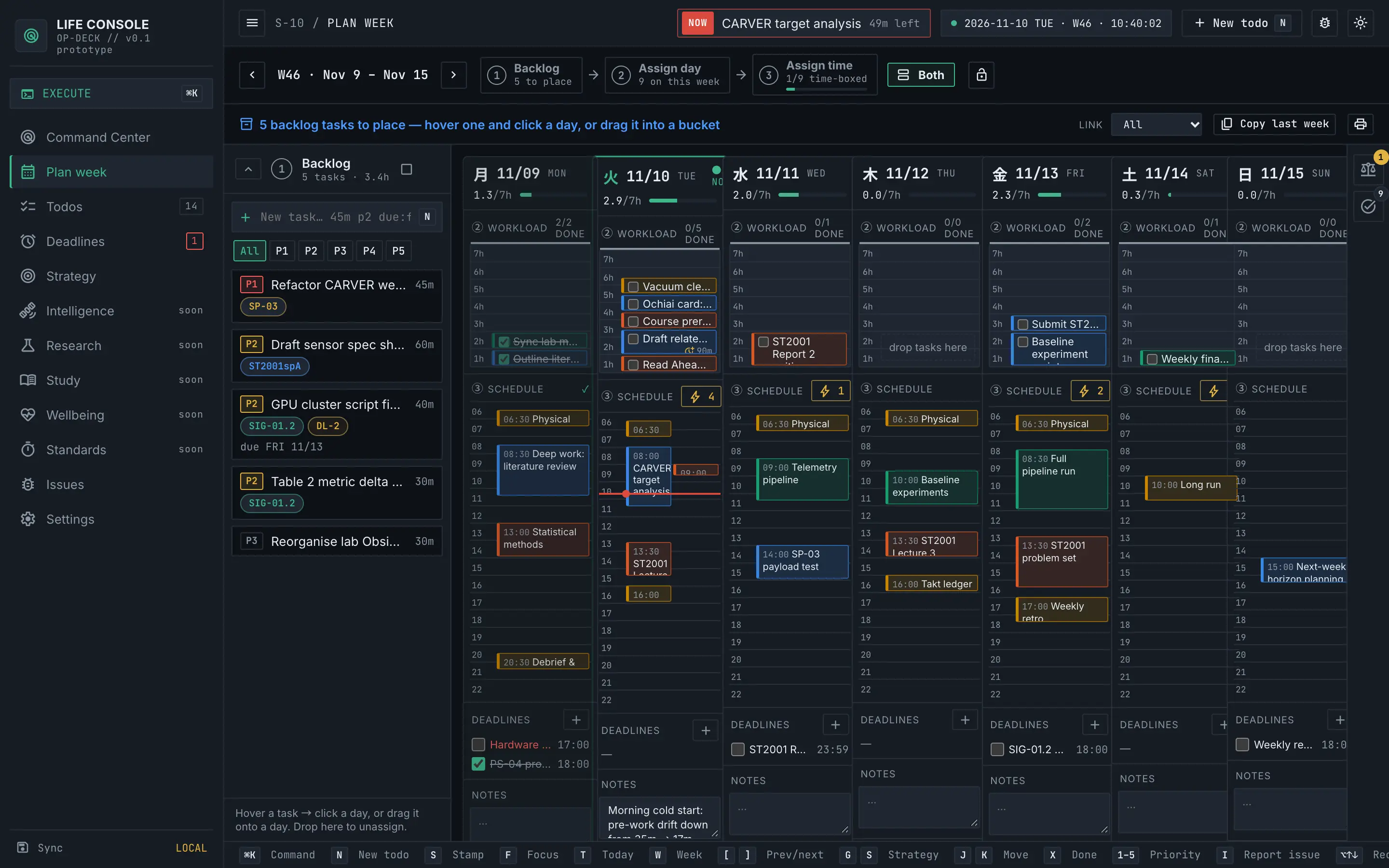
| Time-blocking | Drag tasks onto a day's timeline; Auto time-box fills free gaps by priority | Drag tasks onto your calendar |
| Daily rituals | Morning Briefing and evening Debrief, one decision per step, previewed on the real schedule | Guided daily planning and daily shutdown |
| Workload | A 7-hour budget per day; over-full days are flagged and levelled | Planned-time total per day |
| Calendar sync | No | Google Calendar and Outlook Calendar |
| Integrations | None (JSON export and import) | Asana, ClickUp, GitHub, Gmail, Jira, Linear, Notion, Slack, Todoist, Trello, Zapier and others |
| Goals | Vision → goals → milestones; tasks link to them; goal-flow diagram | Weekly objectives |
| Deadlines | Live countdowns grouped by urgency, with a month calendar | Due dates on tasks |
| Pomodoro | Planning and sittings in whole pomodoros | Focus timer |
| Keyboard | ⌘K palette and single-key shortcuts on every screen | Keyboard shortcuts |
Pick Sunsama if
- your day is mostly meetings in Google or Outlook calendar and you want tasks next to them
- your tasks live in Asana, Jira, Linear, Notion or Trello and you want them pulled into one daily list
- you want native desktop and phone apps
Pick Life Console if
- you don't want a subscription, or want your planner on your own server
- you plan from long-term goals down to today's tasks, and want to see which goal each task serves
- you juggle deadlines and want them as time left, not dates
- you work from the keyboard
Moving a Sunsama routine to Life Console
- Daily planning → Briefing. Sunsama walks you through yesterday's leftovers and today's list. Life Console's Briefing (opened by the morning notification) asks only what needs you: a deadline in the next three days with nothing scheduled, a day over seven hours, tasks without a time, and the one thing for today.
- Timeboxing → Plan week. Drop tasks from the backlog into a day, then onto its timeline, or press Auto time-box to fill free gaps by priority.
- Daily shutdown → Debrief. In the evening it goes through each unfinished task (tomorrow, the backlog, or it's actually done) and previews tomorrow.
- Weekly objectives → Strategy. Write the goal once as a milestone, tag tasks with it (
@SIG-01.2), and the goal flow shows what's left.
There's no importer from Sunsama. Quick-add takes one line per task, such as Draft report 90m due:fri p2, so moving a list over is mostly pasting.