 LIFE CONSOLE
Notion Life OS vs Life Console
A Notion Life OS is a template: linked databases for areas, goals, projects and tasks that you build or buy, then keep running by hand. Life Console is a planner built around that same idea, goals down to today's tasks, where the planning logic is part of the app: it levels your week, fills free time by priority and counts down every deadline. Notion is far more flexible and is also your notes and wiki; Life Console only plans.
| Life Console | Notion with a Life OS template | |
|---|---|---|
| Price for one person | Free | Free plan "for individuals to organize personal projects and life"; paid plans per member |
| Source code | Open source, AGPL-3.0 | Closed |
| Self-hosting | Yes, Docker Compose (guide) | No |
| Setup | Works on first sign-in, with a two-minute tour | Build or buy a template, then adapt its databases |
| Goals | Vision → goals → milestones; tasks link to them; a goal-flow diagram shows what's left | Whatever the template's databases and relations model |
| Weekly planning | Backlog → a 7-hour budget per day → the day's timeline; over-full days are flagged | Database views you set up |
| Time-blocking | Day timeline; Auto time-box fills free gaps by priority | Notion Calendar: Notion database items next to Google, Outlook and iCloud calendars |
| Right now | The current block with a live countdown, and what to do next | No equivalent |
| Deadlines | Live countdowns grouped by urgency, with a month calendar | Date properties and reminders |
| Daily review | Morning Briefing and evening Debrief ask only what needs a decision | A checklist page, if the template has one |
| Notes, docs, wiki | A note per task and per day | Notion's core strength |
| Sharing | One person's planner | Pages and databases shared with anyone |
| Offline | Installable web app that works offline | Desktop and mobile apps, for pages you choose to download |
| Keyboard | ⌘K palette and single-key shortcuts on every screen | Slash commands and shortcuts |
Pick Notion if
- your planner should live next to your notes, journal, reading list and wiki
- you like designing your own system and changing it often
- you plan with other people, or want Google and Outlook calendars beside your tasks
Pick Life Console if
- you've built (or bought) a Life OS and spend more time maintaining it than planning with it
- you want the app to do the planning maths: daily load, free gaps, time left to each deadline
- you want to see which goal each task serves without wiring up database relations
- you want your planner open source, or on your own server
Moving a Notion Life OS to Life Console
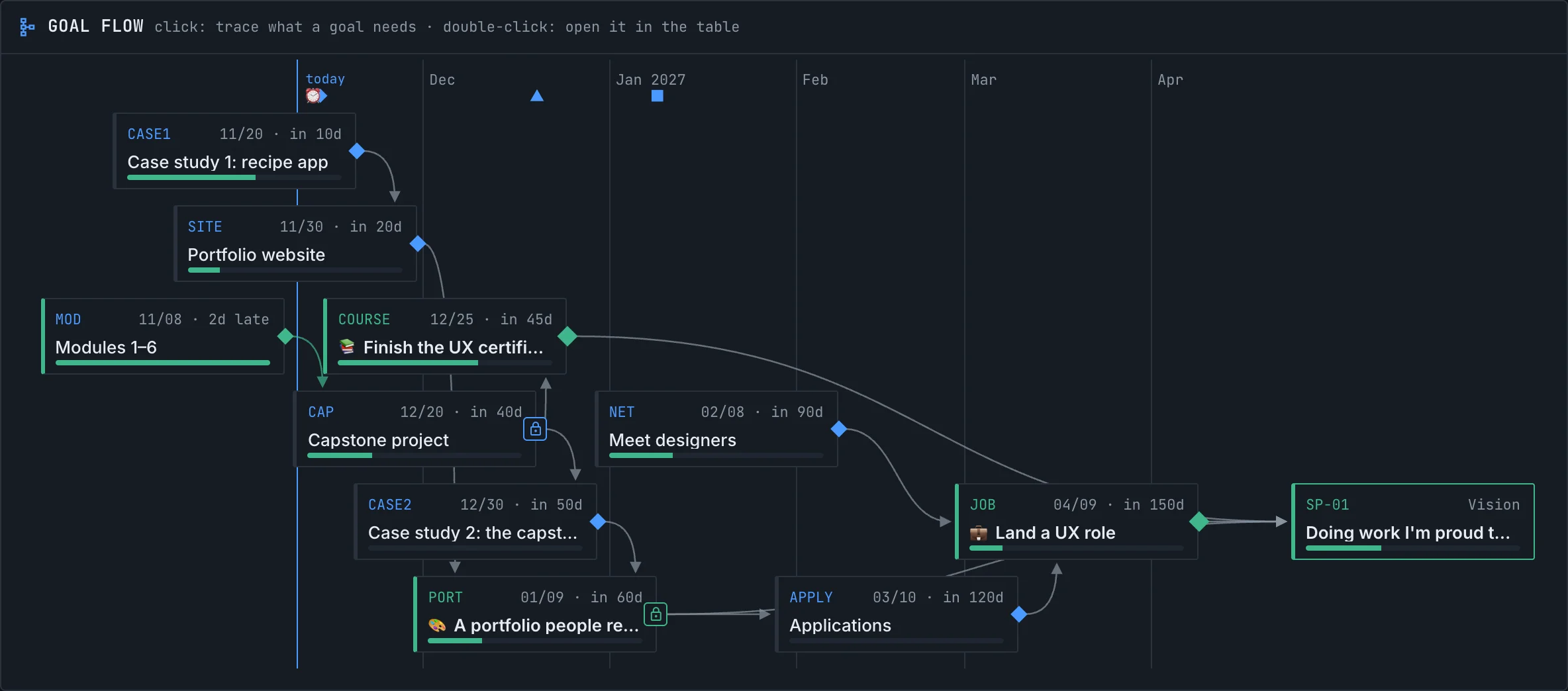
- Areas and goals → Strategy. Make one plan per area of life you track (or just one), add its vision, then each goal and its milestones. Goal names are short codes you choose, such as
FIT-1. - Projects and tasks → the backlog. Paste tasks in one line each with quick-add, such as
Draft report 90m due:fri p2 @FIT-1: the duration, due date, priority and goal link are read from the text. - Weekly review → Plan week. Drag tasks from the backlog into days until each day's 7-hour bar is full, then onto the timeline, or press Auto time-box.
- Daily dashboard → Today. The Command Center replaces the dashboard page: what to do now, today's schedule and the next deadline, kept current without any formulas.
There's no importer from Notion. Export your task database as CSV or Markdown and paste the titles into quick-add; keep your notes and journal in Notion.