 LIFE CONSOLE
Life Console vs Amazing Marvin
Both are personal planners for people whose days don't run themselves. Amazing Marvin is "the customizable task manager for ADHD": a hundred-plus features you switch on one by one, from time-blocking to a Procrastination Wizard. Life Console is free, open source and self-hostable, with one fixed method: plan from long-term goals down to the week, then do the one thing in front of you.
| Life Console | Amazing Marvin | |
|---|---|---|
| Price | Free | $8 a month, or $96 billed yearly; 14-day trial with no card; no free plan (students 50% off, "pay what you can" on request) |
| Source code | Open source, AGPL-3.0 | Closed |
| Self-hosting | Yes, Docker Compose (guide) | No |
| Apps | Web app that installs on phones and desktops and works offline; Mac menu-bar app | Web, Mac, Windows, iOS and Android |
| Approach | One method, ready on first sign-in; a simpler Minimalist console and optional plugins | "300+ customizable settings": turn on only what you need, with Day Planning, List-Based, Spontaneous and GTD workflows |
| Daily planning | Day timeline; Auto time-box fills free gaps by priority; a 7-hour budget per day | Time blocking, daily schedules, a calendar view and a capacity estimator |
| Goals | Vision → goals → milestones; tasks link to them; a goal-flow diagram | Not a separate feature on its features page |
| Deadlines | Live countdowns grouped by urgency, with a month calendar | Flexible due dates; an optional pledge of real money on a deadline |
| Focus | Focus mode with the top three actions; the current block counting down | Super Focus Mode, Task Jar, Spotlight, Procrastination Wizard, Dopamine Menu |
| Pomodoro and time | Planning and sittings in whole pomodoros | Pomodoro timers and time tracking per task |
| Habits | Weekly routines (a plugin) | Habit tracking with streaks |
| Daily review | Morning Briefing and evening Debrief ask only what needs a decision | Part of the Day Planning workflow |
| Importing | One line per task with quick-add | Imports from Todoist, TickTick, Things 3, Sunsama, Microsoft To Do and many others |
Pick Amazing Marvin if
- you want to shape the app to how your brain works, feature by feature
- ADHD tools matter to you: a task jar, a dopamine menu, procrastination help, accountability pledges
- you want time tracking, habit streaks and native desktop and phone apps
- you're moving from another app and want your tasks imported
Pick Life Console if
- you don't want a subscription, or want your planner on your own server
- you'd rather have one clear method than three hundred settings
- you plan from long-term goals and want to see which goal each task serves
- you want each deadline as time left, and the next thing to do counting down on screen
Moving from Marvin to Life Console
- Today list → Today. The Command Center shows the block you're in with a live countdown, what's left today and the next deadline.
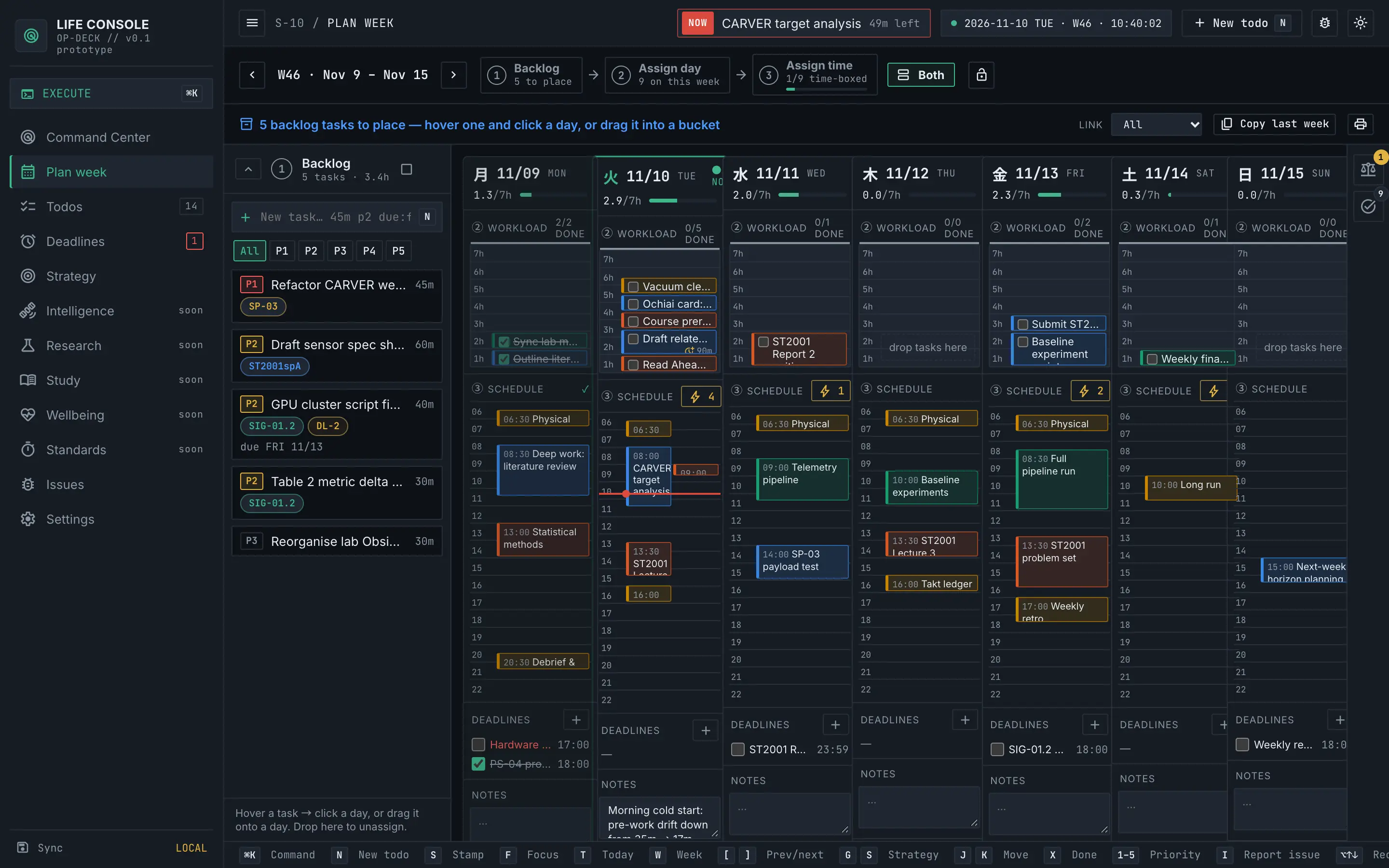
- Day planning and time blocking → Plan week. Drag tasks from the backlog into days until each 7-hour bar is full, then onto the timeline, or press Auto time-box to fill free gaps by priority.
- Long-term goals → Strategy. Write a vision, then goals and milestones, and tag tasks with a goal (
@SIG-01.2); the goal flow shows what's left. - Focus tools → Focus mode. One key (
F) hides everything but the top three actions.
There's no importer from Marvin. Quick-add takes one line per task, such as Draft report 90m due:fri p2, so moving a list over is mostly pasting.