 LIFE CONSOLE
The best time blocking apps, compared
Time blocking means giving every task a slot on the clock instead of leaving it on a list. Any calendar can do it by hand. A time blocking app helps in three ways: it moves tasks onto the day for you, it warns when a day is overfull, and it shows the current block while you work. These seven range from free to $34 a month. The biggest difference between them is whether your day is built around a calendar full of meetings, or around your own task list.
| Best for | Price | Runs on | How it blocks time | |
|---|---|---|---|---|
| Life Console | Planning from goals and deadlines down to today | Free, open source; or self-host | Browser (installs on phone and desktop, works offline); Mac menu-bar app | Day timeline, Auto time-box by priority, 7-hour budget per day |
| Sunsama | Calendar-heavy workdays with tasks from other apps | $17/month billed yearly, $22 monthly | Web, desktop and phone apps | Drag tasks onto your Google or Outlook calendar, guided daily planning |
| Akiflow | Pulling tasks from many tools onto one calendar | $19/month billed yearly, $34 monthly; 7-day trial | Web, desktop and phone apps | Drag to calendar, AI auto-schedule into free slots |
| Structured | A visual day timeline on your phone | Free to start; paid tier priced in the app | iPhone, Android, web, Apple Watch | One timeline of tasks and imported calendar events |
| TickTick | A cheap all-rounder to-do list | Free; Premium $49.99 a year | Phone, computer, tablet, watch | Timeline and multiple calendar views (Premium), Pomodoro |
| Super Productivity | Developers who track time against issues | Free, open source (MIT) | Windows, macOS, Linux, Android, iOS, web | Schedule next to calendar events, timeboxing, time tracking |
| Google Calendar | Blocking time with no new app | Free | Web, Android, iOS | Events you create by hand; Focus time on work and school accounts |
1. Life Console
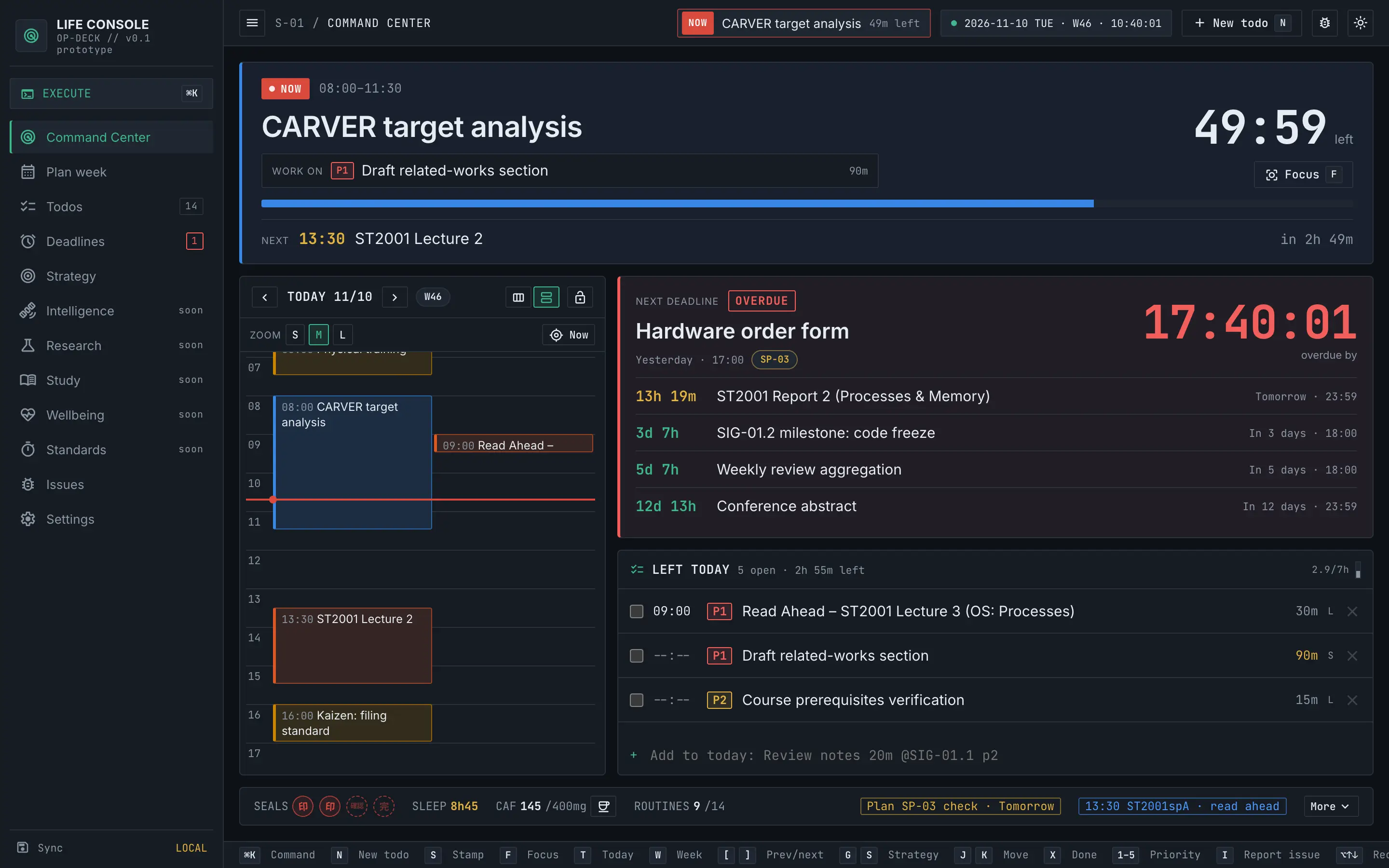
Built for time blocking from a backlog. Plan week shows every day as a 7-hour bucket: drop tasks into a day, then onto its timeline, or press Auto time-box to place untimed tasks into free gaps between 08:00 and 21:00 by priority. While you work, the Command Center shows the current block counting down and what's next, and Focus mode (key F) hides everything else. It also links each task to a long-term goal and shows every deadline as time left, so a full day still points at what matters.
- Free: hosted at life-console.dev, or self-host it with Docker Compose (guide).
- Lacks: calendar sync, integrations and AI scheduling. Your meetings don't appear unless you add them as fixed blocks.
2. Sunsama
The best-known daily planner for knowledge workers. Each morning it walks you through yesterday's leftovers, pulls tasks in from tools like Asana, Jira, Linear, Notion and Trello, and has you drag them onto your Google or Outlook calendar. An evening shutdown closes the day.
- Pick it over Life Console if your day is mostly meetings, or your tasks live in other apps.
- Costs: $17 a month billed yearly or $22 monthly, with no free plan. Life Console vs Sunsama →
3. Akiflow
One inbox for tasks from the other tools you use, next to a calendar to block them on. Its AI assistant, Aki, can auto-schedule tasks into "Smart Time Slots" that work around your meetings, and it has a daily planning ritual and a focus timer.
- Pick it if you want AI to do the blocking and you live in a dozen tools.
- Costs: $19 a month billed yearly ($228), or $34 monthly. No free plan; the 7-day trial asks for a card.
4. Structured
A visual day planner: tasks and imported calendar events sit on one colourful timeline, with weekly and monthly views. It's at its best on a phone, with apps for iPhone, Android and Apple Watch, plus a web app.
- Pick it if you plan on your phone and want something simple and pretty.
- Costs: free to start. Its website doesn't list the paid tier's price; it's shown in the app.
5. TickTick
A full to-do app with lists, Kanban, habits, an Eisenhower matrix and a built-in Pomodoro timer. Time blocking comes through its calendar: the weekly view highlights busy and free blocks, and Premium adds a timeline view and multiple calendar views.
- Pick it if you want one cheap app for tasks, habits and a calendar.
- Costs: free with limits (9 lists, 99 tasks per list, basic calendar); Premium is $49.99 a year.
6. Super Productivity
A free, open-source task manager for focused solo work. Its schedule view sits next to your calendar events, with timeboxing, Pomodoro, and time tracking you can export as timesheets. It imports tasks from Jira, GitHub, GitLab, Linear and others, and syncs through its own encrypted SuperSync, Dropbox or WebDAV.
- Pick it over Life Console if you're a developer whose work lives in issue trackers, or you need detailed time logs.
- Lacks: long-term goals that tasks link to.
7. Google Calendar
The free option you probably already have: make an event for each task and the calendar becomes your time-blocked day. Work and school accounts can also schedule Focus time, blocks with no conflicting meetings. What it doesn't do is know your tasks: nothing moves an unfinished task forward or tells you a day is overbooked.
- Pick it if your blocks are few and you don't want another app.
Time blocking with ADHD
People with ADHD often say time blocking helps because it turns "what should I do now?" into a decision made in advance. What matters in an app: the current block always visible, with a countdown, few choices on screen while you work, and easy re-planning when a block slips. Life Console's Command Center and Focus mode are built around the first two, and when a block slips, the evening Debrief takes each unfinished task one decision at a time (tomorrow, the backlog, or done). Structured's single timeline is also popular for this. Amazing Marvin is a paid planner designed for ADHD, with many optional focus tools (Life Console vs Amazing Marvin →).
Which one?
- Plan from your goals and deadlines, free, no calendar needed → Life Console
- A day full of meetings and tasks from other apps → Sunsama, or Akiflow for AI scheduling
- Plan on your phone with a simple visual timeline → Structured
- One cheap app for tasks, habits and a calendar → TickTick
- A developer who needs time tracking → Super Productivity
- Just a few blocks a week → Google Calendar